Floral Elements Photoshop Stamp Brush: A Creative Must-Have
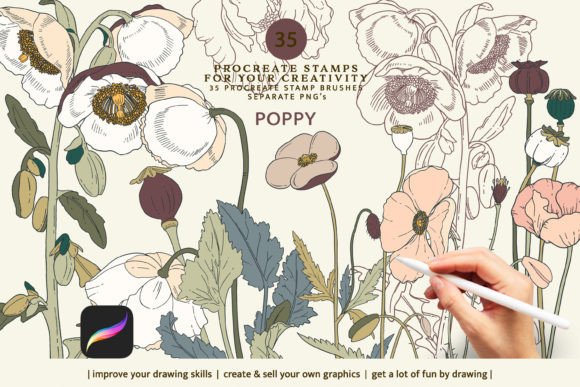
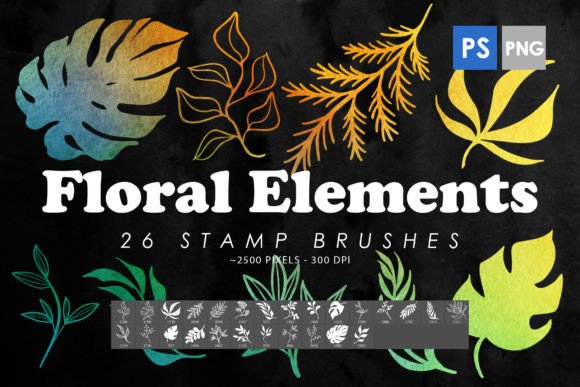
If you're a designer, blogger, marketer, or simply someone who loves to enhance digital visuals with a personal touch, the Floral Elements Photoshop Stamp Brush pack is an invaluable addition to your toolkit. These brushes are more than just tools—they’re creative assets that empower users to elevate their work effortlessly. With 26 high-quality floral stamp brushes and accompanying isolated PNG images, this resource opens up a world of design possibilities.
What Are Floral Elements Photoshop Stamp Brushes?
The Floral Elements Photoshop Stamp Brush collection is a set of pre-designed brush presets for Adobe Photoshop, specifically optimized for use in versions from CS6 to the latest CC editions. Each brush is meticulously crafted to replicate hand-drawn or stylized floral motifs, making them ideal for stamping onto designs. The set includes not only the ABR files but also transparent PNGs, giving you maximum flexibility depending on your project needs.
Why Use These Brushes?
- Time-Saving: Instead of drawing each floral element from scratch, these brushes let you add complex patterns and textures in seconds.
- Versatile Application: They can be used as background elements, overlays, borders, or even as part of intricate graphic compositions.
- High Resolution: With sizes ranging between 2000 to 2500 pixels, these brushes maintain clarity and sharpness at large scales—perfect for print and digital media alike.
- Consistent Quality: Every brush is professionally created to ensure visual harmony and usability across various projects.
Key Features and Strengths
One of the standout qualities of the Floral Elements Photoshop Stamp Brush set is its attention to detail. Each brush stroke mimics natural flow and variation, avoiding the rigid look often found in generic brushes. This realism makes them particularly effective when used in branding materials, editorial layouts, or artistic illustrations.
Another key strength lies in the versatility of the included PNG files. These can be dragged into any design software as standalone graphics, allowing non-Photoshop users or those working in layered environments to benefit from the same beautiful elements. Whether you're creating social media posts, website banners, or printable greeting cards, the PNGs offer a clean and professional solution.
Realistic Textures and Customization
These brushes support layer styles such as drop shadows, gradients, and blending modes. You can adjust opacity, size, rotation, and color to match your specific design goals. This level of customization ensures that the floral elements feel integrated rather than pasted in, which is essential for maintaining a polished aesthetic.
Practical Applications Across Industries
From personal creativity to commercial ventures, the Floral Elements Photoshop Stamp Brush has broad appeal. Here are some real-world scenarios where they shine:
Graphic Design and Branding
Floral elements can add a soft, elegant, or whimsical touch to brand assets. For instance, a stationery line for a wellness company might use these brushes to create custom watermarks or subtle background accents. The ability to scale without losing quality means they work equally well in logos, packaging, or promotional materials.
Digital Marketing and Social Media
Marketers and content creators can leverage these brushes to make visually appealing Instagram stories, Pinterest pins, or email headers. Adding a floral border or overlay can help establish a cohesive theme across platforms, especially for brands targeting women, lifestyle niches, or seasonal campaigns like spring promotions or wedding-related content.
Education and Presentations
Teachers and educators often need engaging visuals for slideshows or classroom materials. These floral brushes can serve as decorative elements in infographics, posters, or educational websites. They help break up dense text and guide the viewer's eye through important information points.
Personal Projects and Hobbyists
Whether you're designing invitations for a garden party or enhancing personal artwork, these brushes provide a quick way to inject personality into your work. Their stamp-like nature makes it easy to place multiple elements without worrying about alignment or spacing issues.
Commercial Printing and Packaging
With high-resolution PNGs available, the Floral Elements Photoshop Stamp Brush set is suitable for print-on-demand services, product packaging, and merchandise design. The floral accents can be used to highlight product features or create unique label designs that stand out on shelves.
Benefits Beyond Aesthetics
While the visual appeal of these brushes is undeniable, their value extends beyond looks. Let’s explore how they contribute to productivity and communication in different contexts:
Usability and Efficiency
By using these brushes, designers avoid time-consuming tasks like manually tracing or redrawing floral patterns. The stamps allow for rapid iteration and experimentation, which is crucial in fast-paced creative workflows. Additionally, the PNG format ensures compatibility across various platforms and programs, reducing technical friction during collaboration or client handoffs.
Enhanced User Experience and Engagement
Incorporating floral elements into digital interfaces or marketing materials can evoke warmth and approachability. This emotional resonance helps improve user experience by making content feel more inviting. For example, a blog post about mindfulness might use floral accents subtly in headers or sidebars to reinforce the theme and encourage readers to stay engaged longer.
Branding Consistency
Using the same floral motifs across different media ensures a unified brand identity. A consistent visual language builds trust and recognition among audiences. These brushes can become signature elements in your brand’s style guide, used in everything from business cards to web banners.
How to Use the Floral Elements Photoshop Stamp Brush Effectively
Here are a few practical tips to maximize the potential of these brushes in your work:
- Layer Blending Modes: Try applying the brushes with blending modes like Overlay or Soft Light to blend them seamlessly into backgrounds.
- Opacity Adjustments: Lower the opacity slightly to give the floral elements a softer, more natural appearance.
- Color Variants: Convert the brushes to grayscale or apply tint overlays to match your color scheme.
- Grouping and Stamping: Group multiple brush layers together and stamp them as smart objects to preserve scalability and editability.
Use Case Examples
- Wedding Invitations: Add a romantic floral border or centerpieces using these brushes for a bespoke look.
- Product Mockups: Use the PNGs to decorate mockups of notebooks, mugs, or phone cases for online shops.
- Editorial Work: Incorporate floral accents into magazine layouts, book covers, or article headers for added elegance.
- Tattoo Design Bases: As a base for tattoo concepts, the brushes offer inspiration and structure for artists and clients alike.
Considerations When Choosing and Using These Tools
When selecting brushes for your projects, it’s important to consider the intended platform and resolution requirements. While the Floral Elements Photoshop Stamp Brush set is already optimized for most uses, always test the final output on screen and in print if applicable.
Additionally, evaluate how well the floral elements complement your existing design style. If your work leans minimalist, choose subtler stamps. For bold and vibrant designs, go all out with larger, bolder elements. Matching the tone and complexity of the brushes to your project ensures a balanced result.
Lastly, remember to organize your brush library. Assigning descriptive names and saving frequently used variations can streamline your workflow and reduce repetition when working on multiple designs.
Where to Find and How to Install
To access the Floral Elements Photoshop Stamp Brush set, search for reputable brush marketplaces or creative resource websites. Once downloaded, installation is straightforward: open Photoshop, go to the brushes panel, click the menu icon (three horizontal lines), and select “Import Brushes.” Choose the ABR file and you’re ready to start enhancing your projects.
Final Thoughts
The Floral Elements Photoshop Stamp Brush set is more than just a collection of digital tools—it's a gateway to faster, more expressive design. Whether you're a seasoned professional or a hobbyist looking to refine your craft, these brushes offer a reliable and stylish way to bring botanical beauty into your creations. By integrating them thoughtfully, you can communicate themes of nature, growth, and artistry while boosting both efficiency and visual impact in your work.