Poppy Stamps, Procreate Brushes: A Time-Saving Tool for Digital Artists
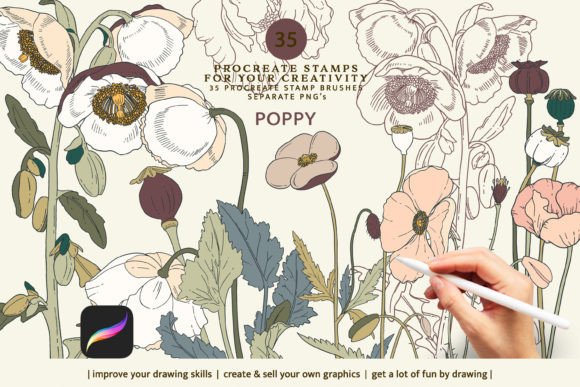
Digital illustration and design workflows often demand a balance between speed and detail. For creators using the Procreate app on iPad, the Poppy Stamps, Procreate Brushes set offers an elegant solution to streamline the process of adding botanical elements to their work. This brush set is designed as a collection of stamps that allow artists to place intricate floral details with a single tap. The result is a more efficient workflow without sacrificing visual richness.
Understanding Poppy Stamps in Procreate
Poppy Stamps are digital brushes within the Procreate ecosystem that function like pre-made stamp images. Unlike traditional brushes that build strokes from scratch, these stamps instantly apply a complete image—such as a flower, leaf, or petal pattern—onto the canvas. Each stamp is optimized for use in Procreate, making it ideal for illustrators, graphic designers, and concept artists who want to incorporate natural motifs into their projects quickly.
One of the standout features of this brush set is its ease of import and use. After downloading the resource, users can easily add it to their Procreate library by following the standard .brushset import procedure. Once imported, each stamp becomes available in the app’s brush menu, ready to be deployed with a simple press of the stylus.
What Makes These Stamps Unique?
- Single-Stamp Application: Instead of drawing each element individually, artists can place entire botanical components with one stroke.
- Customization Options: Users can adjust size, opacity, and color directly within Procreate, enabling seamless integration into diverse artworks.
- High-Quality Vector-Based Designs: The included stamps are crafted to maintain clarity at various scales, which is essential for both print and digital media.
- Complementary PNG Files: In addition to the Procreate brushes, the package includes 35 transparent .png files of all the stamp designs. This makes them accessible even to those who don’t own an iPad or the Procreate app.
Key Features and Practical Value
The Poppy Stamps, Procreate Brushes set contains 35 unique stamps, each representing a different botanical element such as poppies, leaves, vines, and floral clusters. These assets are not only visually appealing but also highly functional in creative contexts. Whether you're working on a greeting card, editorial illustration, branding project, or character design, these stamps offer a consistent and professional look.
While the set does not include colored versions of the stamps (users must manually apply colors), this limitation actually enhances its flexibility. The black-and-white vector-based designs act as stencils, allowing artists to recolor them according to their palette and mood. This approach ensures compatibility with any artistic style, whether minimalist, vibrant, or monochrome.
Usability and Workflow Integration
In practice, the usability of Poppy Stamps shines when applied to time-sensitive tasks. For example, if a designer needs to create a series of seasonal illustrations for a client, incorporating these stamps can significantly reduce the time spent on repetitive elements. Rather than sketching and detailing each poppy separately, they can simply stamp and customize as needed.
Additionally, the transparency of the included .png files makes them suitable for layering and compositing. When used outside of Procreate, perhaps in Adobe Illustrator or Canva, they retain their crisp edges and clean outlines. This dual functionality adds long-term value, especially for teams or individuals who may collaborate across different platforms.
Strengths
- Speed and Efficiency: Perfect for projects where rapid iteration or volume matters.
- Design Consistency: All stamps share a cohesive aesthetic, ensuring uniformity in compositions.
- Cross-Platform Flexibility: While the brushes themselves are exclusive to Procreate, the accompanying .png files open up broader usage possibilities.
- Professional Presentation: The high-quality artwork suggests attention to detail and a polished end result.
Possible Limitations
- iPad Dependency: The brush format only works within Procreate on the iPad, which may exclude desktop users or those unfamiliar with the platform.
- No Color Variants Included: Artists must manually color the stamps, which could slow down certain workflows unless they’re already using layered techniques.
- Learning Curve for New Users: Those new to Procreate may need to familiarize themselves with how to import and manage custom brush sets before fully leveraging the tool’s potential.
Who Benefits Most from Using Poppy Stamps?
This brush set is particularly valuable for professionals and hobbyists involved in digital illustration, branding, and stationery design. It suits anyone who frequently works with organic shapes and patterns, including:
- Illustrators: Those creating children’s book art, editorial pieces, or character backgrounds will appreciate the quick access to detailed botanical elements.
- Graphic Designers: Especially useful for designing logos, social media graphics, or promotional materials with nature-inspired themes.
- Freelancers and Entrepreneurs: Ideal for building templates, packaging concepts, or product mockups that require a touch of botanical flair.
- Bloggers and Publishers: Can enhance blog headers, infographics, or magazine layouts with visually engaging plant motifs.
- Art Educators: Great for demonstrating stamping techniques or teaching about layer styles and blending modes in digital art.
For small business owners or content creators aiming to elevate their visual brand identity, the ability to deploy high-quality botanical elements rapidly is a significant advantage. The stamps help maintain a professional appearance while saving time on asset creation.
Real-World Performance and Customization
In real-world scenarios, the Poppy Stamps, Procreate Brushes perform exceptionally well when used in tandem with other brushes or textures. Their vector nature allows for scaling without loss of quality, which is crucial for maintaining sharpness in printed materials or high-resolution screens.
Customizing the stamps is straightforward. By adjusting the color under the brush settings or applying a fill layer, artists can match the stamps to their project’s color scheme. This feature is particularly useful for creating themed illustrations or branding assets that align with specific palettes.
Consider a scenario where a freelance artist is tasked with designing a series of wedding invitations featuring floral accents. With Poppy Stamps, they can rapidly assemble multiple variations using the same core elements, ensuring consistency while keeping the designs fresh and unique. The stamps also serve as placeholders during the initial layout phase, helping visualize final compositions before committing to full detail.
Observations from Professional Use
From a practical standpoint, the stamps are most effective when used in layers. Applying a base stamp first and then overlaying it with subtle textures or gradients can yield stunning results. One key observation is that the stamps work best when placed strategically rather than densely; overuse can lead to cluttered visuals.
Another benefit lies in their adaptability. For instance, a marketer designing a summer campaign for a wellness brand might use the poppy stamps as background elements or borders. The ability to resize and reposition them freely gives control over the composition’s rhythm and focal points.
How to Get Started with Poppy Stamps
If you already use Procreate, getting started is simple. Download the brush set, transfer it to your iPad via email or cloud storage, and open it in Procreate to install. You’ll find all 35 stamps added to your brush list, ready for use. For non-iPad users, the included .png files can be dragged into design software like Photoshop, Illustrator, or Figma.
Begin by experimenting with different sizes and opacities to see how they interact with your existing artwork. Try combining them with hand-drawn elements or other stamp sets to expand your creative toolkit. Over time, you’ll develop a sense of which stamps work best for specific applications and how to optimize their placement.
Long-Term Value and Creative Potential
The Poppy Stamps, Procreate Brushes aren’t just a convenience—they represent a strategic investment in efficiency and creativity. As trends shift toward natural and botanical aesthetics in branding, fashion, and editorial design, having a curated set of high-quality stamps becomes increasingly relevant.
Moreover, the transparent .png files provide lasting utility beyond the Procreate app. They can be repurposed for web design, print materials, or even as part of larger collage-style projects. Their versatility means they can evolve alongside your creative journey, adapting to new tools and techniques as they emerge.
For educators or workshop facilitators, these stamps can be used to demonstrate digital stamping methods, layer blending, and texture application. They offer a hands-on way to teach complex ideas without overwhelming beginners with too many brush options.
Final Thoughts and Recommendations
When evaluating creative resources, it’s important to consider how well they integrate into your workflow and how much they enhance productivity. Poppy Stamps, Procreate Brushes succeed in both areas by providing a streamlined method for adding botanical elements to digital art. They are particularly suited for illustrators and designers who value precision and efficiency in their craft.
If you’re looking to expand your digital toolkit with assets that combine beauty and utility, this set is worth exploring. However, keep in mind that it requires some familiarity with Procreate and digital illustration practices. For those willing to invest a little time in learning, the return is a faster, more refined creative process.
Ultimately, the decision to adopt Poppy Stamps depends on your specific needs. If your projects regularly involve botanical motifs, or if you’re seeking a way to add decorative elements efficiently, this brush set provides a compelling solution. It's a modest yet powerful addition to any artist’s digital arsenal, supporting both immediate output and long-term creative development.